See Exactly What a MacMenus Price Label Means
The MacMenus pricing methodology separates official promotions, restaurant-specific prices, editorial reference figures, estimates, personalised deals and limited-time offers instead of presenting every number as one national McDonald’s price.
The core rule is simple: record the restaurant, date, item, size and order channel; preserve useful evidence; then publish the price with an honest label and a clear final-check instruction.
How MacMenus Collects and Labels Prices — Direct Answer
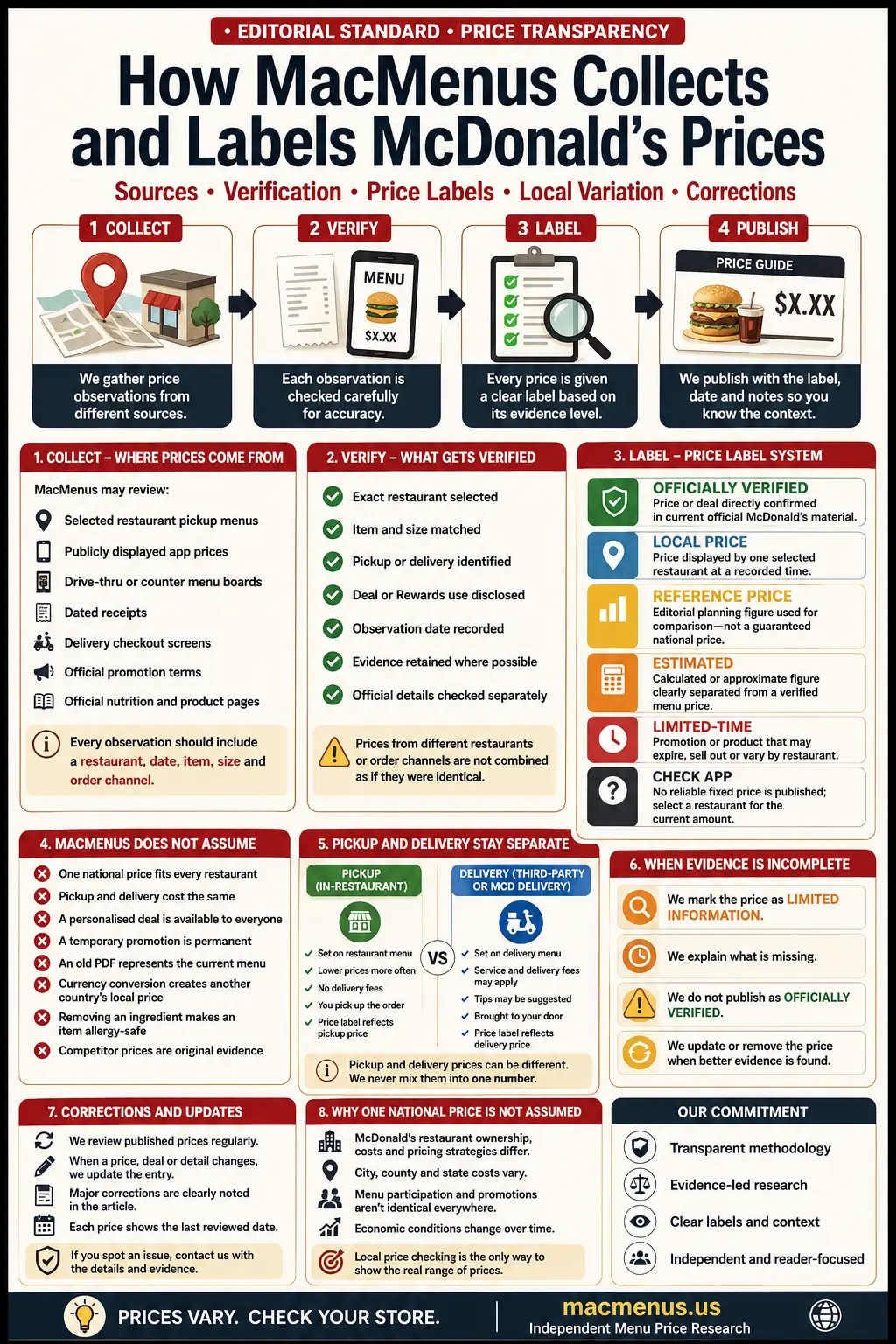
Which MacMenus Price Label Should You Trust?
Use when: a current official McDonald’s page, announcement or promotion term directly confirms the price or deal.
Still check: participation, order method, dates and exclusions.
Use when: one selected restaurant displays a price at a recorded time.
Does not mean: every nearby or nationwide restaurant charges the same amount.
Use when: an editorial planning figure helps readers compare sizes, meals or versions.
Must say: it is not an official guaranteed national price.
Use when: a figure is calculated, inferred or approximate rather than directly displayed.
Must show: the calculation, assumption or reason for uncertainty.
Use when: a deal or product can expire, sell out or disappear by restaurant.
Must show: a confirmed end date, or “while supplies last” when that is the official wording.
Use when: the offer appears only in an individual account or selected restaurant.
Must not imply: every customer can access the same discount.
Use when: no sufficiently reliable current fixed price can be published.
Reader action: select the exact restaurant, item, size and order method.
Best evidence label: “Officially Verified” is strongest for the exact term McDonald’s confirms. “Local Price” is strongest for what one restaurant displayed. A “Reference Price” can still be useful, but it must never be presented as the amount every customer will pay.
Current Official Pricing Facts MacMenus Builds Around
Prices are selected locally
McDonald’s online-service terms state that each restaurant independently determines its prices and applies additional taxes and fees required by law.
Pickup and delivery can differ
The same item can show a different price after changing the restaurant or switching from pickup to delivery.
Not every store sells every item
Products, offers, pickup methods, meal sizes and delivery availability can differ by location and time.
Current future-policy notice: McDonald’s official help pages display revised online-services terms scheduled to become effective on August 24, 2026. MacMenus should recheck ordering, cancellation, refund, Rewards and stored-value wording after that date.
Editorial consequence: a number copied from a national-looking app screen, competitor table or search snippet is not automatically a national McDonald’s price.
The MacMenus Collect → Verify → Label → Publish Workflow
Collect
Capture the displayed price, restaurant, item, size, channel, date and deal context.
Verify
Check whether the evidence is current, internally consistent and supported by official product or promotion information.
Label
Assign the narrowest accurate status instead of forcing every figure into an “official” category.
Publish
Show the number with scope, exceptions, date, reader action and correction route.
What happens at each stage?
Stage |
Required work |
Publish only when |
Stop or downgrade when |
|---|---|---|---|
Collect |
Record store, city/state, date/time, item, size, channel and displayed amount. |
The observation can be understood without guessing missing context. |
The restaurant, size or order method is unknown. |
Verify |
Compare evidence with current official product, promotion and ordering information. |
Product name, configuration and status are consistent. |
An old screenshot conflicts with a newer live page. |
Label |
Choose Official, Local, Reference, Estimated, Limited-Time, Personalised or Check App. |
The label accurately describes the source and certainty. |
“Official” would overstate the evidence. |
Publish |
Add date, caveat, local-check action and source explanation. |
A reader can tell what the figure does and does not represent. |
The wording could make a local price look nationwide. |
MacMenus Source Hierarchy
Sources are not treated as equal. The hierarchy below determines how MacMenus resolves conflicting prices, product status and ordering terms.
Priority |
Source type |
Best use |
Main limitation |
Default label |
|---|---|---|---|---|
1 |
Current official McDonald’s product, promotion, FAQ, help or terms page |
Product status, promotion rules, calories, ingredients and ordering conditions |
Regular restaurant price may still be absent |
Officially Verified |
2 |
Selected restaurant’s current pickup or delivery menu |
Current amount available from that restaurant and channel |
Does not represent other stores |
Local Price |
3 |
Dated receipt or checkout evidence |
What one customer was charged in a defined transaction |
Tax, discounts or account offers may affect the amount |
Local Price or Personalised |
4 |
Multiple comparable store observations |
Building a disclosed minimum, median and maximum range |
Coverage may still be regional or incomplete |
Observed Range |
5 |
MacMenus editorial comparison data |
Helping readers compare product versions before checking locally |
Not an official McDonald’s national price |
Reference Price |
6 |
Competitor article, search snippet or undated screenshot |
Finding a lead that needs independent verification |
May be copied, stale, wrong or missing context |
Do not publish as primary evidence |
7 |
Old PDF or archived menu |
Historical context |
Cannot prove a current price unless still officially current |
Historical |
Conflict rule: when a current official page, selected-restaurant menu and older PDF disagree, the newest evidence relevant to the exact restaurant, country, product and order channel receives priority. The disagreement should be explained rather than silently blended.
What a Complete Price Observation Must Contain
Recommended observation fields
Field |
Example format |
Why it matters |
|---|---|---|
Observation ID |
MM-2026-07-001 |
Prevents two records from being confused. |
Date and time |
2026-07-28 14:30 local |
Prices, offers and availability can change. |
Restaurant |
Austin, TX — store label |
One restaurant does not represent a whole city or country. |
Channel |
Pickup |
Delivery can use different item prices and fees. |
Item and size |
Big Mac — sandwich only |
Prevents a meal price from being reported as a burger price. |
Displayed food price |
$6.29 |
Separates menu amount from tax and fees. |
Promotion status |
Regular / public deal / personalised |
Readers need to know whether they can access the same amount. |
Evidence |
Screenshot retained |
Allows later rechecking and corrections. |
Verification status |
Verified / pending / rejected |
Stops incomplete observations entering a published range. |
Why Pickup and Delivery Prices Stay Separate
Use for restaurant-to-restaurant comparison
- Selected restaurant’s pickup menu price
- Local tax may be added at checkout
- Public or personalised deal may apply
- Pickup channel and time should be recorded
Report the full cost structure
- Food price may be higher than pickup
- Delivery fee may vary
- Service fee may apply
- Small-order fee may apply
- Government delivery fee or tax may apply
- Tip should remain separately identified
No fixed delivery markup: MacMenus does not automatically add 15%, 20% or 30% to a pickup price. The real delivery food subtotal and visible fees must be recorded.
Amount |
Pickup report |
Delivery report |
|---|---|---|
Item price |
Record selected restaurant pickup amount |
Record displayed delivery item amount separately |
Tax |
Show separately when visible |
Show separately when visible |
Service fee |
Usually not relevant |
Record actual visible amount |
Delivery fee |
Not relevant |
Record actual visible amount |
Small-order fee |
Not relevant |
Record when triggered |
Tip |
Normally not part of menu price |
Optional customer payment, not food price |
Final total |
Food + tax + valid extras |
Food + tax + fees + optional tip |
How Promotions, Rewards and Personalised Deals Are Labelled
Locate a current official promotion page, app offer or selected-restaurant listing.
Public offer, new-user offer, Rewards member offer, personalised account deal or restaurant-only promotion.
Pickup-only, app-only, delivery-eligible or excluded from delivery.
Do not hide a required purchase, linked-payment condition, size or eligible-product list.
Use the official end date, “while supplies last” or “limited time” wording accurately.
A promotion is not successfully applied until the price reduction appears before payment.
Deal type |
Correct label |
What must be disclosed |
|---|---|---|
Current national announcement |
Officially Verified |
Dates, participation, excluded channels and required purchase |
Offer displayed by one restaurant |
Local Promotion |
Restaurant, date and channel |
Offer visible only in one account |
Personalised App Deal |
Not available to every customer |
Reward redemption |
Rewards Price / Points |
Points required and paid extras |
Expired official promotion |
Historical |
Original dates and no current availability claim |
Unconfirmed competitor claim |
Do not publish as current |
Independent verification required |
How MacMenus Builds a Price Range
A price range should represent real comparable observations—not the lowest number found on one website and the highest number copied from another.
Sample size
State exactly how many verified observations were included.
Coverage
List cities, states, regions and any excluded areas.
Date range
Show when observations were collected and last reviewed.
Comparable records
Use the same item, size, channel and promotion status.
Metric |
What it tells the reader |
Publication rule |
|---|---|---|
Minimum |
Lowest qualifying observed price |
Do not call it a universal cheapest price. |
Median |
Middle observation after sorting the sample |
Useful when a few unusually high or low prices exist. |
Maximum |
Highest qualifying observed price |
Identify whether it came from pickup or delivery. |
Availability rate |
Share of checked restaurants that displayed the item or deal |
Disclose checked-store count and date. |
Pickup-delivery difference |
Observed food and fee difference by channel |
Never replace real observations with a fixed percentage. |
Minimum publication standard: disclose sample size, collection dates, geographic scope, restaurant-selection method, item definition, order channel, exclusions and whether tax, promotions or fees were included.
What MacMenus should not publish before real data exists
How MacMenus Treats PDFs and Archived Menus
A PDF can be useful evidence only when its publisher, country, version and effective period are clear. A stale PDF is not treated as current merely because it is hosted on an official or well-known domain.
PDF condition |
How MacMenus treats it |
Required action |
|---|---|---|
Current official PDF with clear date and market |
Supporting official evidence |
Check that no newer official web page conflicts with it. |
Official PDF without clear date |
Uncertain |
Do not use as the sole current-price source. |
Old official nutrition or menu PDF |
Historical context |
Label the period and verify current data separately. |
Competitor-generated PDF |
Research lead only |
Independently verify every price and claim. |
User-uploaded receipt PDF |
One local transaction |
Check date, restaurant, deal, tax and privacy information. |
Stale-document rule: when a current live official page and an old PDF disagree, MacMenus does not silently combine the two. The older document is either labelled historical or excluded.
Corrections, Freshness and Change History
Minor correction
Spelling, formatting or a non-material wording improvement can be corrected without changing the research conclusion.
Material correction
A wrong price, calorie figure, product status, promotion rule or location scope should trigger a visible content review.
Scheduled recheck
Temporary offers, upcoming terms and current toys require a specific future recheck rather than permanent wording.
Do not rely only on the previous article version or saved snippet.
Price, date, product, meal contents, calories, channel or participation.
Update cards, tables, FAQs, calculations, image caption and schema where affected.
Delete “official,” “national,” “available everywhere” or fake-freshness claims when evidence does not support them.
Only after the article and its current sources have genuinely been checked.
Preserve useful historical context when an old deal, product or price claim was materially different.
Pricing Methods and Strategies: Educational Context
This section answers related educational searches. It does not claim that MacMenus chooses McDonald’s business prices. McDonald’s restaurants determine their own prices; MacMenus observes and labels information for readers.
In business education, a pricing strategy in marketing explains how a seller selects a price to meet objectives such as profit, growth, market share, positioning or customer value. A pricing strategy in a business plan normally explains the intended customer, cost structure, competitor context, target margin, discount policy and how prices support the broader business model.
The importance of pricing strategy comes from its effect on revenue, perceived value, demand, brand positioning and the ability to cover costs. MacMenus does not know an individual restaurant’s internal costs or margins, so it does not reverse-engineer a restaurant’s pricing strategy from one menu amount.
10 types of pricing strategies with examples
Pricing method |
How it works |
Simple example |
MacMenus relevance |
|---|---|---|---|
Cost-plus pricing strategy |
Adds a target markup to the product’s calculated cost. |
A meal costing $4 to produce is priced after adding the desired margin. |
MacMenus cannot verify internal restaurant costs, so it does not label prices as cost-plus. |
Value-based pricing |
Sets price around the customer’s perceived value. |
A premium burger commands more than a basic hamburger. |
MacMenus can compare features but cannot prove the seller’s internal value model. |
Competitor-based pricing |
Uses rival prices as an important reference. |
A restaurant positions a meal near similar fast-food bundles. |
Competitor prices are context, not evidence of a McDonald’s local price. |
Penetration pricing |
Introduces a product at a lower price to build adoption. |
A new drink launches with an introductory offer. |
Label the offer as limited-time when officially supported. |
Price skimming |
Starts high and decreases as broader market segments enter. |
A new technology launches at a premium. |
Usually educational context, not a label MacMenus assigns to a menu item. |
Bundle pricing |
Groups items for one combined price. |
Burger, Fries and drink sold as a meal. |
MacMenus compares the bundle with separate-item prices. |
Promotional pricing |
Temporarily reduces a price or adds an incentive. |
App-only discount or limited Meal Deal. |
Requires dates, participation and offer conditions. |
Dynamic pricing |
Changes price using demand, timing, location or other conditions. |
A delivery marketplace displays different costs by area or time. |
MacMenus records what was displayed; it does not assume the pricing algorithm. |
Psychological pricing |
Uses price presentation to influence perception. |
$4.99 rather than $5.00. |
MacMenus reproduces the displayed figure without claiming why it was chosen. |
Economy pricing |
Uses low costs and limited extras to support a lower price. |
A basic value item with a simpler build. |
MacMenus may compare value, but does not claim access to internal cost design. |
These pricing strategies with examples are educational definitions. They explain common pricing methods and strategies; they do not prove which internal strategy a particular franchise used.
Cost-plus pricing strategy: why MacMenus cannot calculate it
A cost-plus pricing strategy requires reliable information about food cost, labour, rent, utilities, royalties, packaging, waste, local taxes and the target markup. MacMenus generally sees the public price—not the complete internal cost base—so publishing a “true markup” would be speculation.
Methods of pricing PDF
Visitors searching for a methods of pricing PDF can use the print button at the bottom of this page and choose “Save as PDF.” The saved version includes the ten-strategy table, MacMenus price labels and evidence workflow without pretending to be an official McDonald’s pricing document.
Important distinction: business pricing strategy asks, “How should a seller set the price?” MacMenus methodology asks, “What price was displayed, where, when, through which channel, and how confidently can it be reported?”
How Readers Should Verify a Local McDonald’s Price
Search using an address, city, ZIP code or current location.
Confirm the complete address because the selected restaurant controls the transaction.
Pickup creates the cleanest local menu-price comparison.
Check item name, count, flavour, sandwich-only or meal configuration.
Kids, Small, Medium and Large should never be compared as though they are the same item.
Record the amount before adding customizations, tax or delivery fees.
Identify whether the offer is public, personalised, points-based or order-method limited.
Confirm restaurant, item, size, channel, tax, fees and final payable total.
Methodology Warnings and Troubleshooting
Problem |
Why it fails |
Correct action |
|---|---|---|
Restaurant is unknown |
The price has no reliable location scope. |
Label as unverified or exclude it. |
Meal and sandwich prices are mixed |
The records describe different products. |
Separate sandwich-only, meal and large-meal observations. |
Pickup and delivery are averaged together |
Delivery can use different food prices and fees. |
Maintain separate channel datasets. |
Personalised deal is published as public |
Other readers may not qualify. |
Label it as personalised and explain eligibility. |
One store becomes a national average |
The sample cannot represent national variation. |
Publish it only as a local observation. |
Old PDF conflicts with live information |
The PDF may describe a previous menu period. |
Use the current source and preserve the PDF as historical context. |
Screenshot has no date |
Freshness cannot be established. |
Do not use it as current evidence. |
“Official” is used for an editorial estimate |
The label overstates certainty and source authority. |
Change it to Reference or Estimated. |
Price changed after publication |
Restaurant prices are dynamic local information. |
Recheck the evidence, update the label and record the real review date. |
Calculator output is mistaken for a menu price |
A calculation is not a displayed restaurant amount. |
Label every computed result as Estimated or Calculated. |
Examples of the Methodology in MacMenus Guides
Official Sources Used for Pricing Rules
These links are placed after the methodology explanation so readers understand what each source is used for.
Pricing Methodology FAQs
Does MacMenus publish official national McDonald’s prices?
No. MacMenus uses “Officially Verified” only when current official material directly confirms a price or promotion. Regular restaurant prices are normally labelled Local, Reference or Check App.
What does a MacMenus reference price mean?
It is an editorial planning figure used to compare products, sizes or meals. It is not a guaranteed national price and should be checked against the selected restaurant.
What is a local price?
A Local Price is an amount displayed by one identified restaurant at a recorded time through a stated order channel.
Why does MacMenus separate pickup and delivery prices?
Delivery item prices may be higher than pickup, and delivery, service, small-order, tax and tip amounts can change the final total.
Does MacMenus use a fixed delivery markup?
No. MacMenus records the actual displayed delivery food price and fees rather than applying one unsupported percentage to every restaurant.
Can an old official PDF prove a current price?
Not by itself. A stale PDF is treated as historical unless its version and effective period are current and no newer official evidence conflicts with it.
How does MacMenus build a price range?
A publishable range should use comparable verified observations and disclose sample size, locations, collection dates, item definition, order channel, exclusions, minimum, median and maximum.
What happens when evidence is incomplete?
The price should be downgraded to Reference, Estimated or Check App, or excluded until the missing restaurant, date, size or channel is verified.
How are personalised app deals reported?
They are labelled Personalised App Deal and are not presented as available to every customer or restaurant.
How often does MacMenus update prices?
Dates should change only after a real source and content review. MacMenus should not claim daily updates unless actual daily verification occurs.
What is the difference between pricing strategy and pricing methodology?
A business pricing strategy explains how a seller decides what to charge. MacMenus pricing methodology explains how publicly displayed prices are collected, verified, labelled and communicated.
What is a cost-plus pricing strategy?
Cost-plus pricing adds a target markup to the calculated cost of a product. MacMenus generally cannot verify restaurant operating costs or margins, so it does not claim a menu price was calculated this way.
Where can I get a methods of pricing PDF?
Use the Print or Save as PDF button in the tools section to save this page’s pricing-strategy table and MacMenus methodology for offline reading.
How can I report a wrong price?
Provide the article URL, restaurant city and state, observation date, item, size, pickup or delivery channel, displayed amount and any non-private evidence. The claim should then be rechecked before correction.
Methodology Tools
Price-label decision tool
Select the evidence conditions. The tool recommends the narrowest MacMenus label; it does not verify the evidence automatically.
Recommended label
Build a price-observation note
Create a structured note for internal verification. Do not include private payment details, account information or personal addresses.
Observation report
MacMenus.us is an independent informational website and is not affiliated with, endorsed by or operated by McDonald’s Corporation. MacMenus does not set restaurant prices or guarantee availability. Product names and trademarks belong to their respective owners. The selected restaurant’s live checkout is the final source for the price a customer can currently pay.